

Change Pickup and Delivery Contact
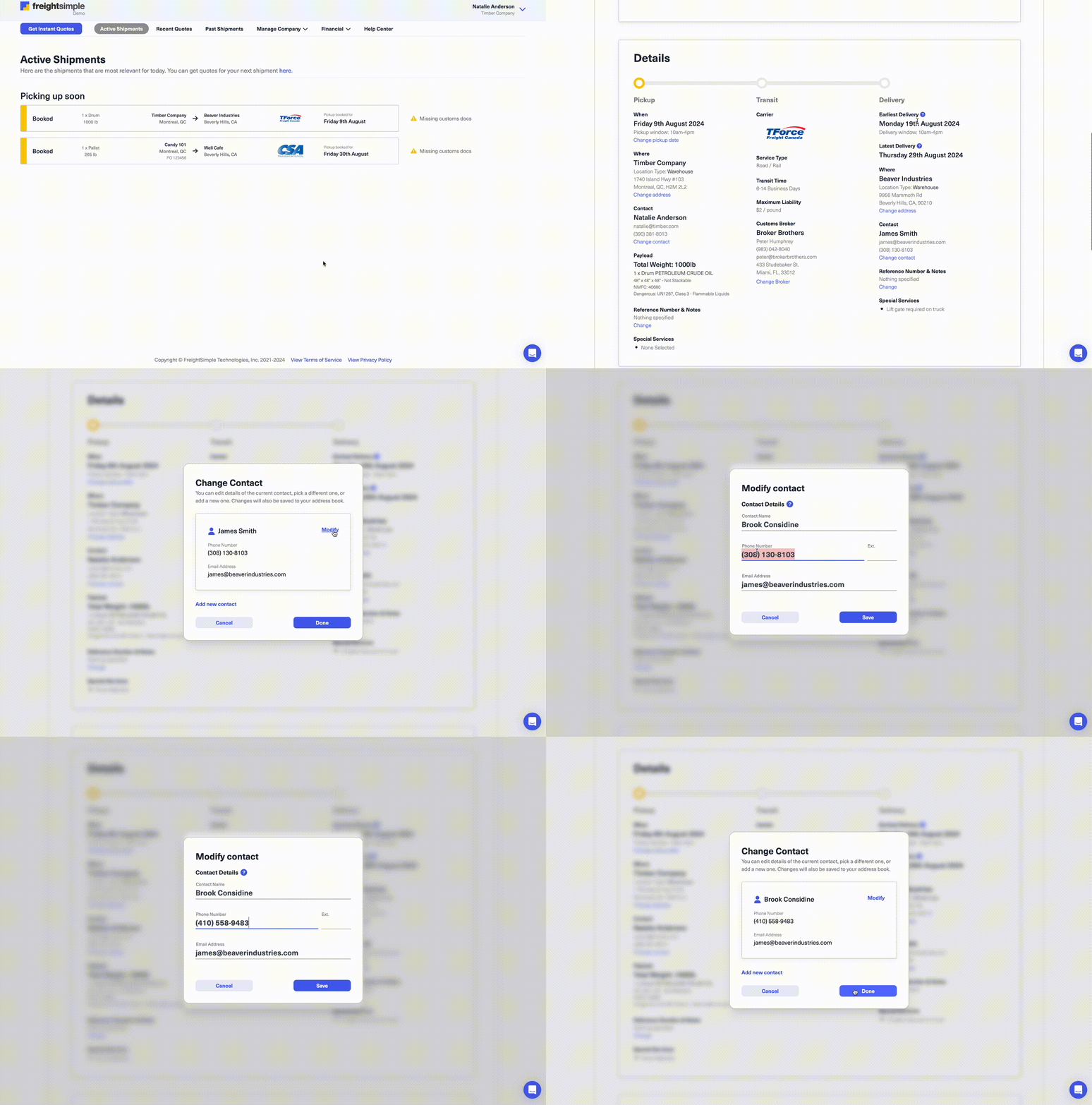
Need to update the pickup or delivery contact for your shipment? You can make changes quickly and easily after booking by following these steps:
How to Modify Pickup/Delivery Contacts
- Access Your Shipment Details:
Log in to your FreightSimple account, locate the shipment you wish to update, and scroll down to the Pickup/Delivery Contacts section. - Click “Change Contact”:
Select the Change Contact option to edit the existing contact details or add a new one. - Update or Add New Contact:
Enter the updated contact information or add a new contact as needed. Once finished, click Save to apply the changes. - Confirmation Notification:
You will receive an email confirming your changes with the carrier after they are processed.
Important Notes
- Timeframe for Changes: Contact updates can only be made within one week of your original pickup date.
- Need Assistance?: If you need to make changes outside of this timeframe, please contact us at support@freightsimple.com, and our team will assist you.
Related Article: Learn how to Change Pickup/Delivery Reference Numbers
Keeping your shipment details accurate and up-to-date is simple with FreightSimple!