

Change pickup and delivery addresses
You can update the pickup or delivery address on your shipment yourself, even after booking. Here's how.
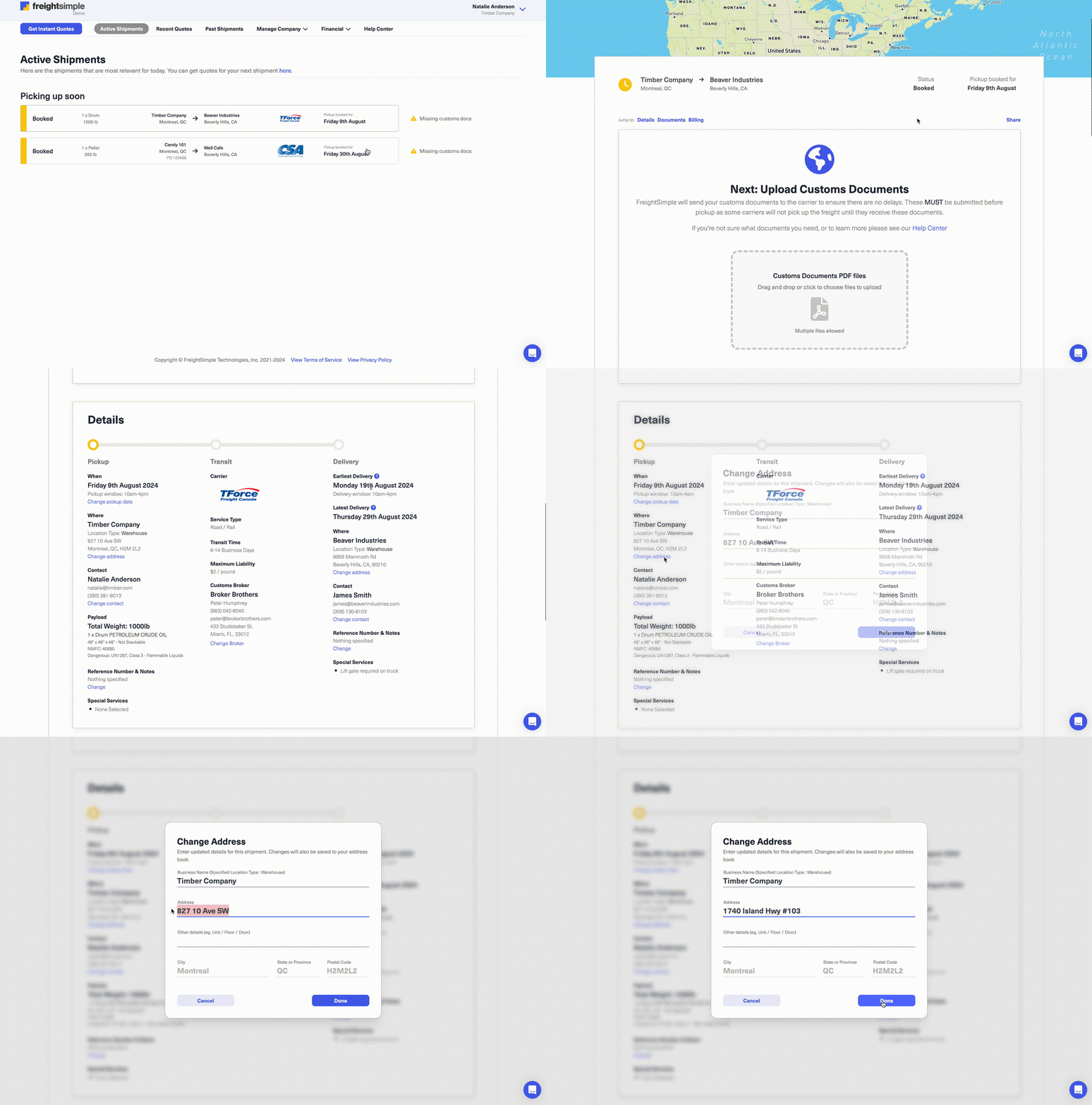
How to change an address
-
Open your shipment details
Log in to your FreightSimple account, find the shipment you want to update, and scroll to the Pickup/Delivery Address section.
-
Click "Change Address"
Select Change Address to edit the current address details.
-
Enter the new address
Type the updated address and click Done to save.
-
Get your confirmation
You'll receive an email confirming the change once the carrier has processed it.
Good to know
- Timeframe. Address changes can only be made within one week of your original pickup date.
- Pickup restrictions. A pickup location can only be changed before the freight has been picked up.
- Postal or ZIP code changes. If your update changes the postal or ZIP code, contact us by live chat or at support@freightsimple.com, since it may affect your quote.
- Need help? If you need to make a change outside that window, email support@freightsimple.com and we'll sort it out with you.
Was this article helpful?
Thanks for letting us know.
What was missing?
Sorry about that. Our team can answer it directly.
Find who to contact